
Codex usage limits
I hit the Codex usage limit. These are the options.
The $20 plan can feel generous right up to the moment a weekly limit interrupts a working day. Paying $100 is a large jump, so I looked at the choices in between.
TLDR:
What I would do
If the $20 plan runs out too often and $100 feels excessive, my pick is a second $20 account. The bill stays at $40 and you keep the Codex workflow. I would buy credits for the odd deadline and test another provider only if I wanted its workflow too.
The free resets got my attention
I will admit it: the frequent Codex resets got me excited. Then banked resets arrived and the deal felt even better. If I ran through a five-hour or weekly window, I had a way to get back to work without changing tools or opening another bill.
That changed how I used Codex. I started treating resets as part of the subscription instead of a hard budget. OpenAI now documents banked resets for some referral promotions. Redeeming a full banked reset clears both the five-hour and weekly windows, then moves the weekly reset date to about seven days after redemption. The reset changes the calendar instead of adding capacity to the old window.
Free resets made the $20 plan feel much bigger. Once I began relying on them, any change to the reset system changed the value of the subscription. That is why I started tracking what each fresh window gave me.

Community reports made the limits harder to trust
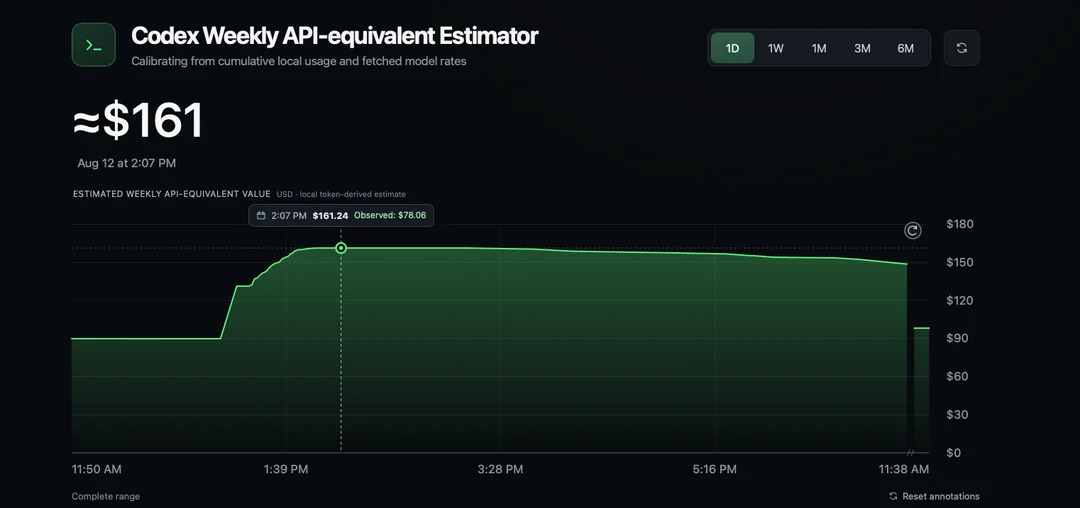
The uncertainty comes from the amount behind the percentage. One recent r/codex post compared a third-party estimate before and after a reset and reported that the weekly API-equivalent value fell from about $160 to about $100. Other commenters described faster usage drain after the same reset.
It is one user's estimate, but it gives me a useful test: compare the same model and similar tasks across several fresh windows. If the percentage starts falling faster, I can decide from my own usage instead of arguing over a screenshot.
Check which Codex limit you reached
Before paying for anything, I check the usage page and match the percentage to its window. Codex can expose a short window and a weekly window. A short-window limit that resets soon needs a different answer from an exhausted weekly allowance with six days left.
OpenAI says Codex usage varies with the size and complexity of the work, the model, and where the task runs. A small local change may use a fraction of the allowance consumed by a long task over a large repository. This is why message counts and API-equivalent estimates remain rough planning tools.
I check the account for a banked reset, purchased credits, an upgrade, or a wait-until time. Codex Switcher puts the reported usage and reset time beside each saved account, so I can see which account has room before I start the next task.
- Match the percentage to the five-hour or weekly window.
- Check the exact reset time before spending money.
- Compare similar models and tasks across several windows.
- Treat unknown usage as missing data, not unlimited capacity.
Option 1: Buy a reset or add credits
A Perplexity report shows OpenAI testing an $8 reset button. OpenAI does not list a fixed public reset price, so check the amount shown on your account. Some Plus and Pro users can also buy credits after the included limit runs out.
An $8 reset can rescue one deadline. As a weekly habit, the math gets ugly. A full banked reset clears both windows and moves the weekly reset date about seven days from redemption, so I would check exactly what the purchase resets before paying.
Credits give you finer control than a plan jump, but they also turn a fixed subscription into variable spend. OpenAI uses the included allowance first and then draws from the credit balance. Auto top-up can purchase more credits when the balance falls below a threshold, so I would set a monthly ceiling before enabling it.
Option 2: Use the API and control the bill
API billing is the cleanest technical answer when I want more capacity without another subscription. It is also the easiest option to underestimate. The API charges for input, cached input, and output tokens. Long contexts, high reasoning, fast modes, and several agents can turn one coding session into a bill that no longer resembles a $20 plan.
API costs depend on the workload. OpenAI publishes token prices and lets customers set project budgets and notification thresholds. A smaller model, tighter context, cached input, and a hard monthly cap can keep the experiment controlled. I would start with a small budget and review actual usage after a week instead of guessing from somebody else's workload.
This route also changes the setup. A ChatGPT subscription does not include API usage, and API billing remains separate. Choose it when you want metered flexibility and understand the tools that will send requests. It is a poor fit if your main reason for subscribing was one predictable monthly number.
Option 3: Add another coding provider
Claude Code is the obvious second subscription to test. Claude Pro costs $20 when billed monthly and includes Claude Code, but Anthropic applies shared usage limits across Claude and Claude Code. When the allowance runs out, Anthropic offers the same broad choices: wait, upgrade, enable usage credits, or switch to pay-as-you-go billing. You still face limits with a different billing system and workflow.
The bigger cost is workflow. You now maintain another login, instruction file, model behavior, permission system, and set of habits. That can still be worth it if Claude performs better on part of your work or gives you useful capacity while Codex resets. I would test it on the same two repositories before moving a daily workflow.
OpenCode and Ollama solve a different problem. OpenCode can route to paid models through Zen, while Ollama runs local models on your Mac. Both add setup and model choices. I would compare the work they produce, not their cheapest advertised entry point.
Option 4: Pay for a second Codex subscription
For steady use between the $20 and $100 tiers, a second subscription is the most predictable choice. Two $20 accounts cost $40 and keep the same Codex workflow. Each account comes with its own usage allowance.
The setup also gives work and personal projects clean separation. Each account keeps its own billing, history, and workspace. I name them clearly so I know which one I am using before I start a task.
The catch is switching. OpenAI's built-in account switcher can keep two accounts available in ChatGPT web, but OpenAI says it does not support Codex Desktop. Repeated logout and browser authorization gets old when a limit stops you in the middle of a task. That friction is why account-switching tools exist.
The free and convenient ways to switch
codex-auth is the free option. It saves named Codex logins and switches them from Terminal. Choose it if a command-line workflow suits you.
I made Codex Switcher to make the second-account option painless on Mac. It keeps your accounts and available usage in the menu bar, then switches with a click. It is free to try for three days on macOS 14 or later.
Both tools switch accounts you already have. They do not change an account's limits. I pause account-bound work, choose the next account, confirm the switch, and continue.
My conclusion after comparing the options
If I hit a short limit once in a while, I wait. If one deadline blocks me, I consider a small credit purchase with auto top-up disabled. If metered usage becomes frequent, I compare the last month's credit cost with a second subscription before paying again.
I would add Claude Code for work where Claude earns the second workflow. I would use the API for automation or precise model control, with a hard monthly budget.
If you like Codex, often exhaust one $20 account, and cannot justify $100, a second subscription is the cleanest middle ground. You spend $40, keep the same workflow, and solve the remaining switching friction with the free CLI or Codex Switcher.
Track the account, reset window, task, and extra spend for a month. You will know whether credits, a second subscription, or a different provider costs less for your own work.
Current sources
- OpenAI: Using Codex with your ChatGPT plan
- OpenAI: Using credits for flexible usage in ChatGPT
- OpenAI: Use multiple accounts with account switching
- OpenAI: API pricing
- Anthropic: Claude plans and pricing
- Anthropic: Using Claude Code with Pro or Max
- OpenCode: Zen pay-as-you-go model service
- Community report: estimated Codex limit changed after reset
- Perplexity report: OpenAI tests an $8 reset button
- GitHub: free codex-auth account switcher